You're not the problem. You're just out of hours.
A step-by-step system for putting AI agents to work in your business — so you get 5–15 hours back every week, in 30 days, without hiring and without learning to code.
About a day and a half of what a part-time hire costs you in a month — paid once, not every month.
- Instant digital download
- 60-page guide + 4 companion tools
- Service business & ecommerce editions
The real constraint
It was never demand. It's hours.
If your business does $200k–$900k a year with one to three people, growth doesn't stall because customers stop showing up. It stalls because you run out of yourself — the salesperson, the account manager, the bookkeeper, and the person answering “do you have this in blue?” at 9pm.
Doing it yourself
- 6 hrs/week on repetitive work
- × $40/hr of your time
- × 52 weeks
$12,480 / year
in your own hours, gone to repetition
A well-set-up agent stack
- $20–150 / month, typical
- handles ~60% reliably in quarter one
- frees ~3.5 hrs/week, realistically
$240–1,800 / year
for the same category of work
This isn't “replace yourself with AI.” It's buying back the bottom half of your task list for less than the cost of a single client dinner.
Who this is for
Built for owners who are out of hours, not out of ideas.
This is for you if…
- You run a service business or an online store doing roughly $200k–$900k a year
- You're a team of one to three people, wearing every hat
- You're losing hours a week to the same customer questions, lead follow-up, content, or admin
- You want systems you can implement yourself with point-and-click tools — no developer required
- You'd rather buy back your evenings than manage another employee right now
This isn't for you if…
- You're after a fully autonomous “run my whole business” system — this guide argues against that on purpose
- Your work is bespoke, judgment-heavy delivery with little repetitive volume to automate
- You want AI theory — this is a workbook meant to be applied, not read once and shelved
What's inside
Twelve chapters. Organized by what's actually eating your week.
Plus four appendices to flip to directly when you're stuck — a toolkit reference, a troubleshooting guide, FAQ, and glossary.
Why the constraint at your revenue size is hours, not demand — and the actual economics of an agent vs. a hire.
Page 4
A 15–20 minute diagnostic — time audit, the Automatability Filter, Impact × Effort scoring — that produces your top 3 automations.
Page 7
Chatbot vs. assistant vs. automation vs. agent, in plain English, plus the Supervision Levels (L0–L3) you'll use for everything.
Page 10
The 3-layer stack (general assistant, orchestration, point-solution agents), example budgets, and the 30-minute test-drive protocol.
Page 12
8 more chapters, including the full build walkthrough and rollout plan
Appendix A — Your Toolkit, and How to Use It
How the four companion files map to each chapter.
Appendix B — Troubleshooting: When Things Go Wrong
The ordered checklist for fixing an underperforming agent.
Appendix C — Frequently Asked Questions
Straight answers to the questions owners ask before starting.
Appendix D — Glossary
Every term, defined once, in plain English.
The companion toolkit
Four files that turn the guide into something you use.
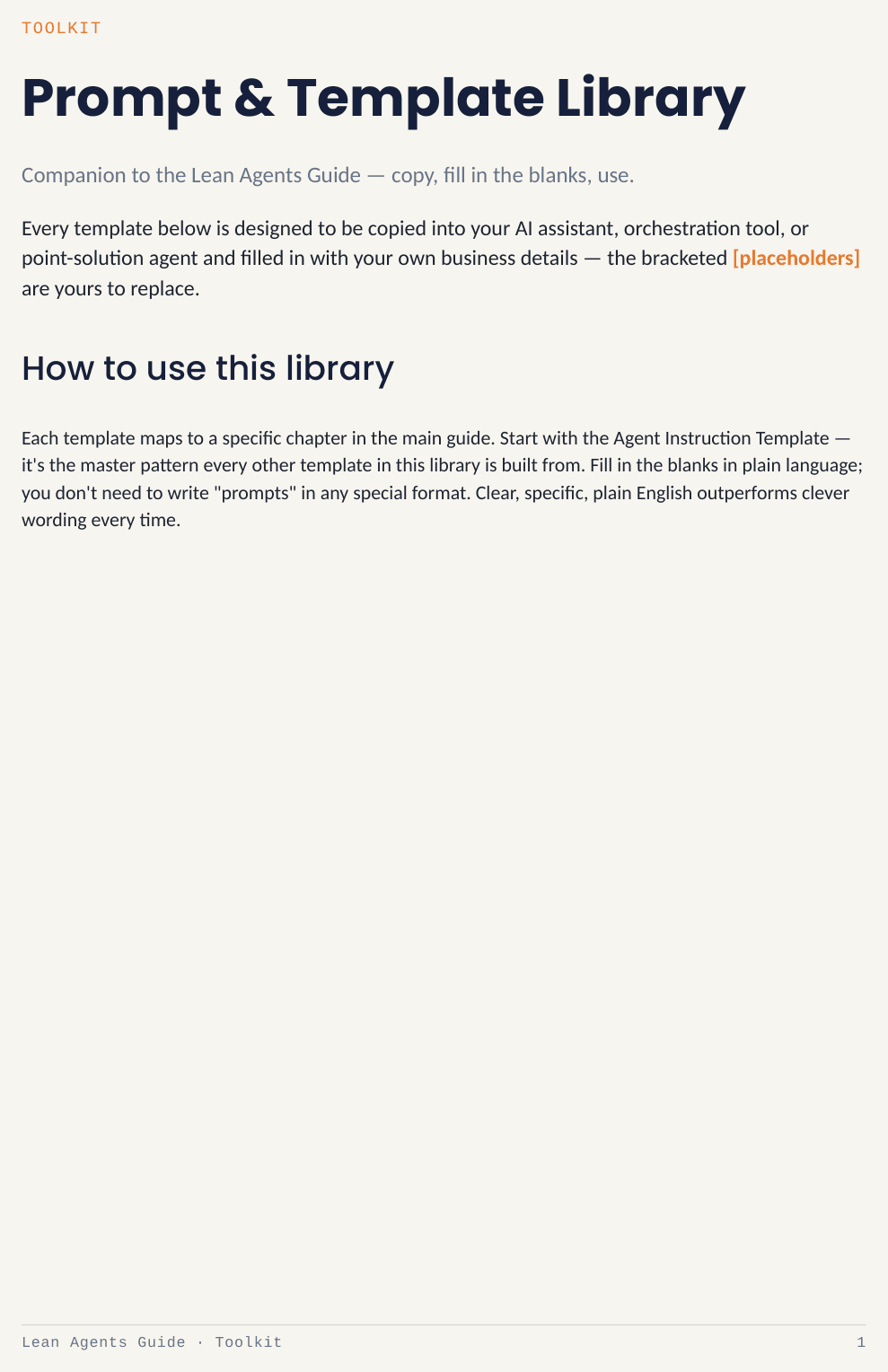
PDF · 13 pages
Prompt & Template Library
12 copy-paste templates — the Agent Instruction Template, Customer Service Context Document, Brand Voice Document, Sales First-Touch Reply, Cart Abandonment sequence, Payment Reminders, and more.
Fill in the bracketed placeholders with your own business details — no prompt-engineering skill required.
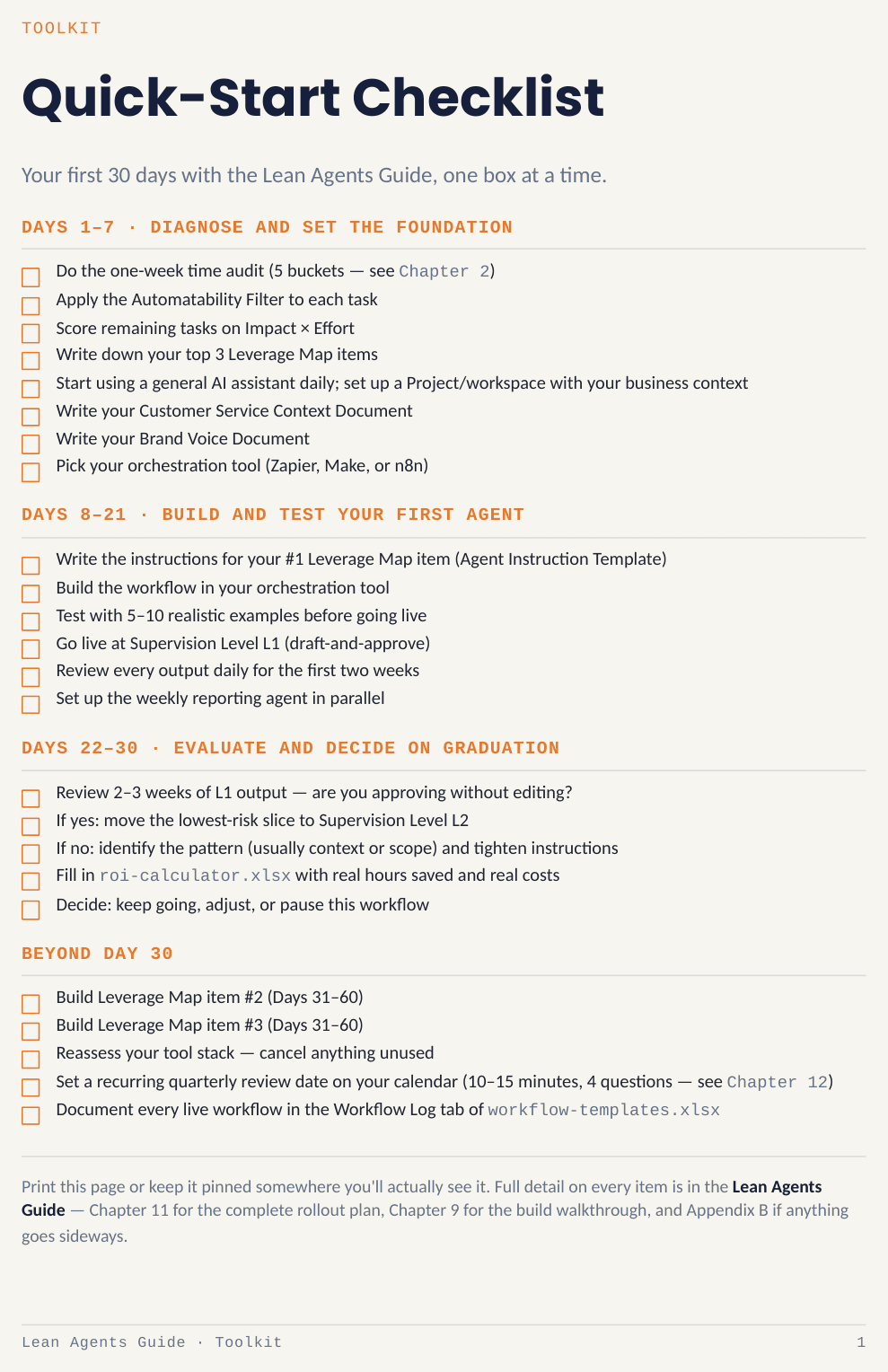
PDF · 1 page
Quick-Start Checklist
Your first 30 days, one box at a time — diagnose (days 1–7), build and test your first agent (days 8–21), evaluate and graduate (days 22–30).
Printable. Pin it somewhere you'll actually see it.
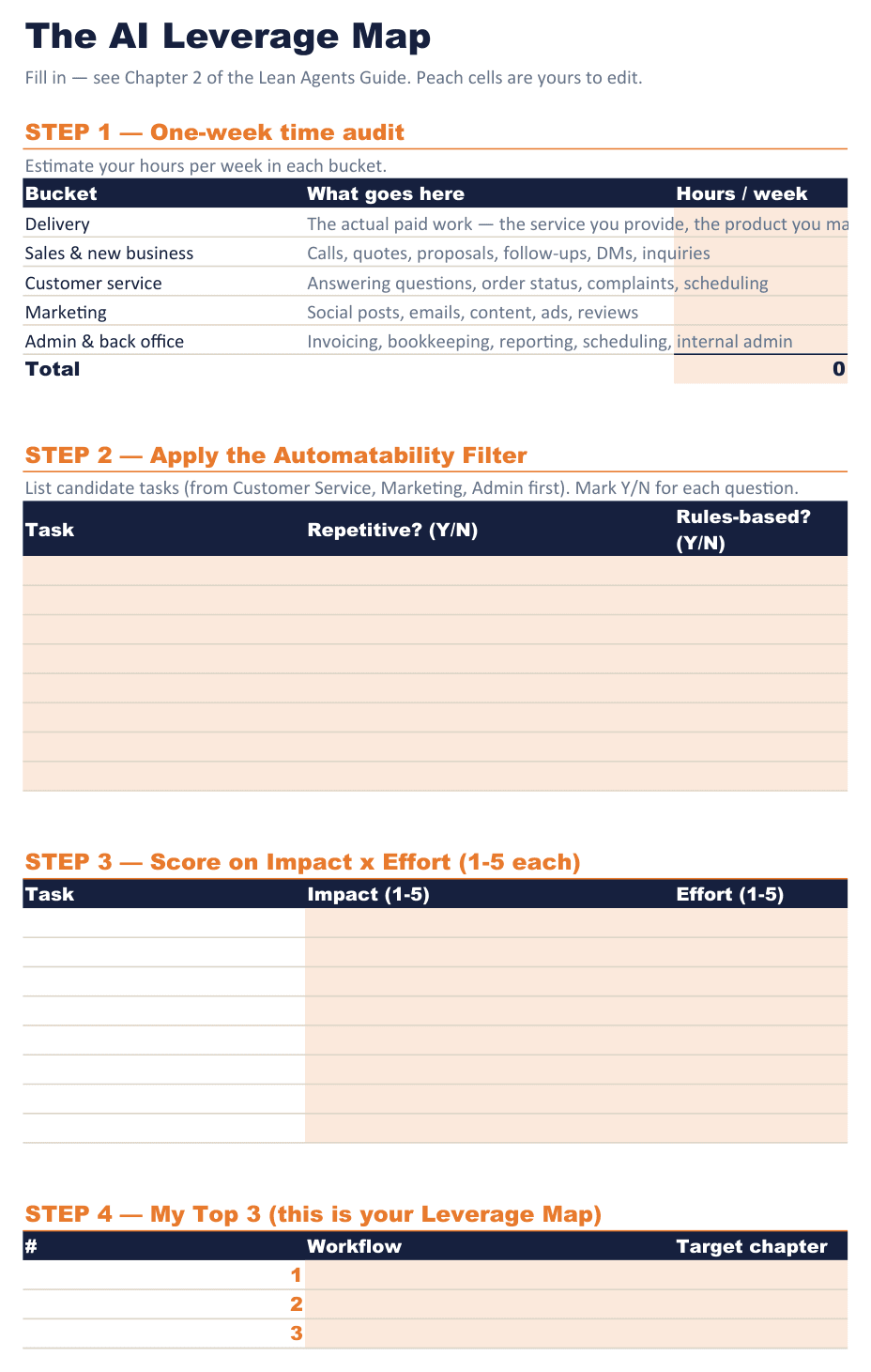
XLSX · 3 sheets
Workflow Templates
The Leverage Map worksheet, step-by-step Workflow Blueprints for every chapter, and a Workflow Log to document what you've built.
The exact worksheet referenced throughout the guide — not a generic spreadsheet.
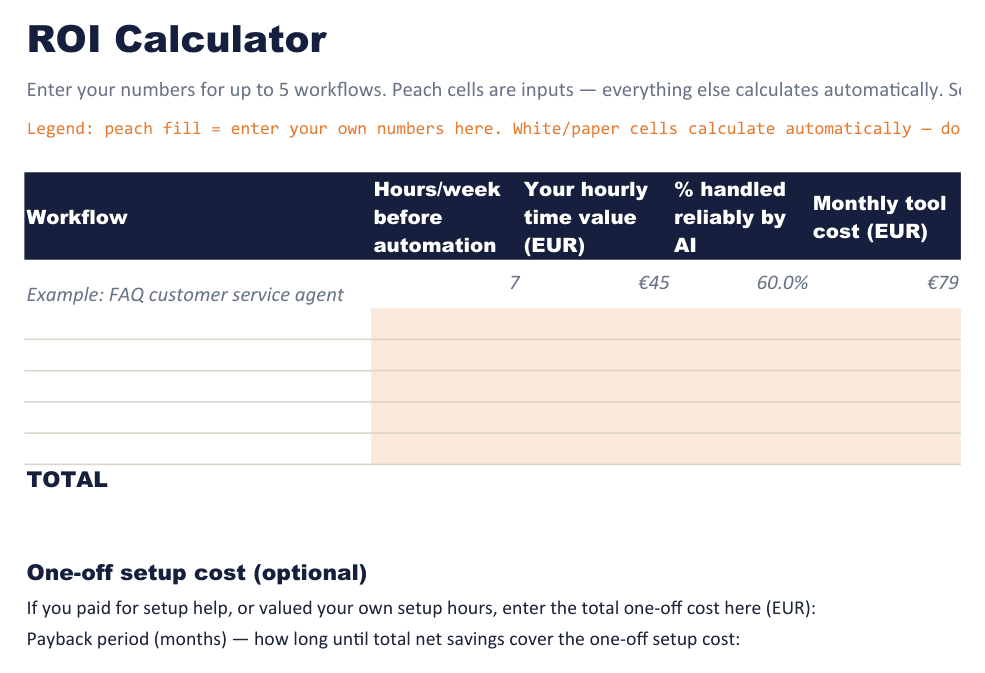
XLSX
ROI Calculator
Plug in real hours saved and real monthly cost to see, in dollars, whether a workflow is actually paying for itself before you scale it.
Used at day 30 to decide: keep going, adjust, or pause.
The method
Every agent in this guide is built from the same four parts.
Understand these once and you can evaluate any tool a vendor shows you in about 60 seconds — it's the framework the entire guide runs on.
Trigger
What starts it — a new email, a form submission, a missed call.
Context
What it's allowed to know — your FAQ, price list, past orders, brand voice.
Action
What it's allowed to do — draft a reply, send it, update a sheet, book a slot.
Checkpoint
Where a human gets a say — the dial you control, from full review to autonomous.
The Supervision Levels — your control dial
How much a human checks before anything happens — the one dial every workflow in the guide runs on.
Human does it
No AI involved yet — anything you haven't automated.
AI drafts, human sends
Everything, in week one, no exceptions.
AI acts, human spot-checks
Proven, low-stakes, high-volume tasks, after 2–3 weeks of clean L1 output.
AI acts autonomously
Very narrow, well-tested tasks only — never money, legal, or a first-time customer.
What it actually looks like
One real exchange from Chapter 5.
Customer email
Hey, do you ship to Ireland and how long does it usually take?
Agent's drafted reply — waiting in your approval queue
Hi! Yes, we ship to Ireland — it usually takes 4–6 business days. Let me know if you'd like tracking added at checkout, happy to help!
Why this works
9 seconds, not 90. The agent did the recall and the writing; you did the one thing only you should do at first — confirm it's right before it goes out.
Try a page of it
This is a real page from the Quick-Start Checklist.
Days 1–7 of 30, exactly as they appear in the PDF. Check a few off — this is the same checkbox mechanic that runs through all 30 days.
Days 1–7 · Diagnose and set the foundation
Pilot customer feedback
What pilot customers are saying.
4.9 average across 34 pilot customers
A handful of their notes below, sent to us directly and kept close to how they actually wrote them.
“Honestly almost refunded it in the first week because I got stuck on the tool setup part (not the guide's fault, I just don't know what an API key is lol) but my nephew helped me for 20 min and now the follow-up thing runs every morning before I even open my laptop. Wish I'd done this a year ago.”
Aysha K.
Pilot customer
“Skipped most of it tbh, went straight to the toolstack chapter and the checklist. That's really all I needed. Haven't touched the ROI calculator yet, will probably get to it eventually. Solid for the price.”
Rob M.
Pilot customer
“My daughter sent me this because she got tired of me complaining about doing invoices on Sundays. It's good! A little text-heavy for what it is, I skimmed some of it, but the part about the three questions to ask before automating something stuck with me — I use it now for basically every decision in the business, not just AI stuff.”
Deb R.
Pilot customer
“Works as advertised, nothing crazy. Saved me maybe 3–4 hrs a week which is real money for a one-person shop. Wouldn't call it life-changing but I'd buy it again.”
Anonymous
Pilot customer
“Bought this at 11pm after a bad day dealing with customer emails, read the whole thing that weekend, built my first agent Monday morning before coffee even. Told two other guys in my trade group about it, one of them bought it too I think. The governance chapter was more than I expected honestly — didn't think a guide this size would cover GDPR stuff, but here we are.”
Frank A.
Pilot customer
Get the full system
One payment. Instant access.
one-time payment
- Lean Agents Guide — 60-page PDF, 12 chapters + 4 appendices
- Prompt & Template Library — PDF, 12 ready-to-use templates
- Quick-Start Checklist — PDF, your first 30 days
- Workflow Templates — XLSX, 3 sheets
- ROI Calculator — XLSX
Delivered instantly to your email after checkout — nothing to wait on.
About a day and a half of what a part-time hire costs you in a month — paid once, not every month.
FAQ
Questions worth asking before you buy.
Yes. Every workflow in the guide is built with point-and-click tools designed for non-developers (Zapier, Make, or n8n at the more advanced end). If you can build a spreadsheet formula, you can build most of what's here.
No — that's a myth the guide explicitly pushes back on. AI agents replace repetition, not judgment. You still decide, price, and stand behind your work; the guide keeps money, legal, and first-time-customer moments as human checkpoints throughout.
A general assistant is only layer one of three. The time savings in this guide come from layer two — connecting that assistant to your actual triggers and actions with an orchestration tool — which is exactly what Chapters 4 and 9 walk you through building.
Both. Chapters 5–8 include a worked example from each — an electrical contractor and a Shopify skincare brand — so every workflow is shown applied to both models.
Five files, delivered instantly by email after checkout: the 60-page guide, the Prompt & Template Library, the Quick-Start Checklist, the Workflow Templates spreadsheet, and the ROI Calculator spreadsheet.
Most readers land in the “starter” (under $50/month) or “growth” ($50–200/month) tier for the first 90 days — Chapter 4 gives exact price bands so you're never guessing what a tool should cost before you buy it.
Your first agent can be built in under 2 hours.
That's what a focused first attempt takes, start to finish — this guide shows you exactly which one to build first, and how.